這些 macOS 設定救了我的命
這些是我離不開的 macOS 設定,他們很難被發現,除非有意尋找。
功能設定
- 調整 Finder 的標題代理圖標出現速度為即時。
defaults write NSGlobalDomain "NSToolbarTitleViewRolloverDelay" -float "0" && killall Finder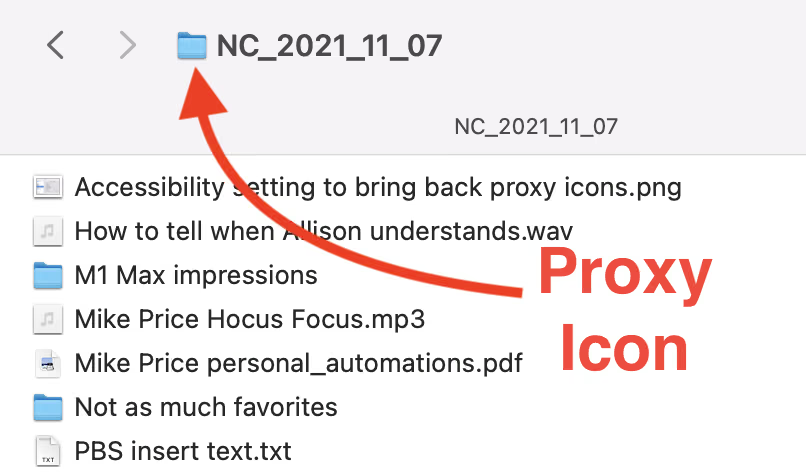
- 禁用長按選擇帶有重音符號的字元形式,這樣你就可以長按連續輸入。如果有應用級是否啟用的需求參考「Settings for ApplePressAndHoldEnabled - Neil」。
defaults write -g ApplePressAndHoldEnabled -bool false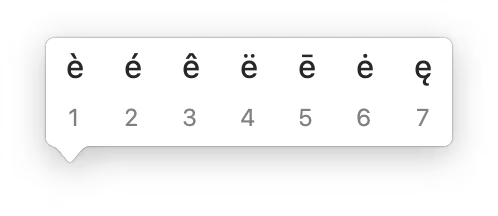
- 關閉 Music app 中新歌曲開始播放時的通知。
defaults write com.apple.Music "userWantsPlaybackNotifications" -bool "false" && killall Music- 啟用按下 Control + Command 拖曳視窗功能,無須拖拽應用程式的標題欄。
defaults write -g NSWindowShouldDragOnGesture -bool true外觀設定
- 使用隱藏的 accent color,基於色彩 iMac 的隱藏設定,Shout out「Use iMac M1 accent colours on any Mac」 written by George Garside。
首先啟用基於硬體的 accent colors。這需要啟用 NSColorSimulateHardwareAccent 功能。
defaults write -g NSColorSimulateHardwareAccent -bool true然後選擇你想要的顏色,選擇介於 3 到 8 之間的顏色(包含 3 和 8)
defaults write -g NSColorSimulatedHardwareEnclosureNumber -int 7
- 調整 menu bar 右側部分的圖標間隔,劉海屏的 MacBook 推薦修改。
defaults -currentHost write -globalDomain NSStatusItemSpacing -int 10
defaults -currentHost write -globalDomain NSStatusItemSelectionPadding -int 8
安全驗證
使用 Touch ID 驗證本機 sudo,提升了便利性的同時沒有減少安全性。
具體啟用方式參考「In macOS Sonoma, Touch ID for sudo can survive updates」。
鍵位設定
Edit: 我不再繼續使用 Karabiner-Elements,已經被 BetterTouchTool 取代。
我首先透過 Karabiner-Elements 覆寫了 function keys,讓原本 f3、f4 作為 illumination_down 和 illumination_up(鍵盤亮度),對應 f1、f2 的熒幕亮度。
Hot take:Caps Lock 是鍵盤上最沒用的鍵。人們輸入大寫字符只用 Shift。
我透過 Karabiner-Elements 覆寫了 Caps Lock 的功能:
-
單獨按下時,其作用為 Escape。這比直接去伸手探鍵盤左上角的按鍵更加高效,作為 Vim 用戶這一點是絕對的殺手級功能。
-
當同時和其他按鍵按下時,其作用為 Control。有些快捷鍵的組合按下的壓力很大,但如果 Control 能調整一個更順手的位置,其方便程度也不言自明。
Complex Modifications:
{
    "description": "Change caps_lock to left_control if pressed with other keys, change caps_lock to escape if pressed alone.",
    "manipulators": [
        {
            "from": {
                "key_code": "caps_lock",
                "modifiers": { "optional": ["any"] }
            },
            "to": [{ "key_code": "left_control" }],
            "to_if_alone": [{ "key_code": "escape" }],
            "type": "basic"
        }
    ]
}